

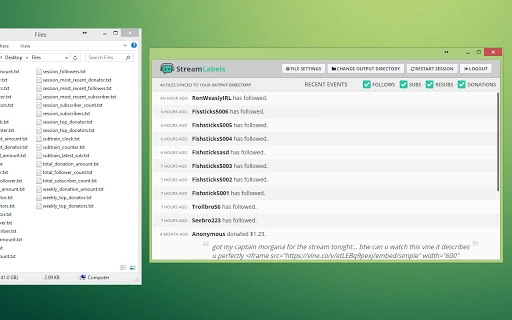
Description
Download Stream Labels – Chrome Apps, Chrome Extensions, ChromeOS, Chromebook
Overview
Stream Labels is a desktop application designed to support live streamers by generating and updating real-time text files for integration into popular streaming software such as OBS and XSplit. The tool specializes in displaying dynamic on-screen content, including recent followers, subscribers, donation highlights, and subtrains. These files can be used as static text or configured for scrolling effects, enhancing the visual engagement of a live broadcast.
The software operates locally on Windows and Mac systems, ensuring that streamers can maintain control over their content without relying on external web services during broadcasts. It is particularly useful for content creators who want to showcase live audience interactions without manual updates. By automating the display of key metrics, Stream Labels reduces the need for constant manual input and helps maintain a professional, dynamic stream environment.
Target users include Twitch, YouTube, and other platform streamers who rely on real-time audience engagement features. The application is built with simplicity in mind, focusing on core functionality rather than complex interfaces. While the developer, Stream Labels, is known for its focus on streaming utilities, no additional background information is available beyond the provided details.
Key Features & Capabilities
- Real-Time Event Updates – Automatically generates and refreshes text files based on live channel events, including new followers, subscribers, and donations.
- Customizable Output Files – Supports multiple file types for use in OBS, XSplit, and similar software, including static text and scrollable text formats.
- Top Donations Tracking – Offers dedicated files for individual donation highlights, allowing streamers to showcase significant contributions without aggregation.
- Subtrain and Combo Management – Tracks and displays subscription streaks and combo subscriptions, with configurable timers and visibility options.
- Resub Support – Includes an option to display resubscriptions in subscription-related files, enhancing recognition of loyal supporters.
- Click-to-Open Links – Donation messages now include clickable links, improving viewer interaction and transparency.
- Local Login Storage – Credentials are stored locally, reducing the need for repeated login sessions during broadcasts.
These features enable streamers to maintain a dynamic and interactive broadcast without manual intervention. For example, a Twitch streamer can use the generated files to display a live scrolling feed of recent donations, while a YouTube streamer might use the subtrain file to highlight ongoing subscription streaks. The tool is designed to integrate seamlessly into existing workflows, minimizing setup time and technical overhead.
User Interface, Workflow & Performance
Stream Labels features a minimal, functional interface focused on ease of use and quick access to essential controls. The layout prioritizes clarity, with straightforward navigation and clearly labeled settings. Users can configure event types, file output locations, and display preferences through a clean, organized panel.
The workflow is designed to be efficient, requiring minimal input after initial setup. Once logged in, the application runs in the background, updating files at regular intervals. This allows streamers to focus on their content rather than managing on-screen displays manually.
Performance details were not specified by the developer. However, based on general software behavior, the application is expected to operate with low resource usage, given its focused purpose and file-generation role. The developer did not provide additional system requirements or performance metrics. Stability is assumed to be consistent with long-term use, as the software has been in active development since 2015 with regular updates.
Compatibility & System Requirements
Stream Labels is compatible with Windows and Mac operating systems, supporting both platforms for desktop use. The current version is 3.3.1, with a file size of 30.0 MB, indicating a lightweight installation. The application is designed for use on standard desktop environments and does not require specialized hardware.
Exact system requirements were not listed. Compatibility information was partially provided, confirming support for Windows and Mac. The developer did not specify minimum CPU, RAM, or storage requirements. Users are advised to ensure their system meets standard desktop application requirements for optimal performance.
Pros and Cons
Pros
- Free to use with no licensing restrictions
- Lightweight installation at 30.0 MB
- Supports popular streaming platforms like OBS and XSplit
- Generates customizable text files for dynamic on-screen content
- Includes features for donations, subscriptions, and follower tracking
- Local login storage improves convenience
Cons
- Developer did not provide detailed system requirements
- Performance behavior under load was not specified
- Only available for Windows and Mac, no support for Linux or ChromeOS
- Interface lacks advanced customization options
- No built-in preview or real-time display within the app
FAQ Section
Is Stream Labels compatible with OBS and XSplit?
Yes, Stream Labels generates text files that can be integrated into OBS, XSplit, and other streaming software as source elements. These files are designed to work with standard text or scrolling text features.
Can I use Stream Labels without an internet connection?
The application requires an initial internet connection to authenticate and fetch live event data. Once logged in, it may continue to function locally, but real-time updates depend on periodic online checks.
Is the software safe to download and use?
Stream Labels is a desktop application developed for streamers and distributed through official channels. It does not contain known malware or security threats. As with any software, users should download from trusted sources.
Does Stream Labels support ChromeOS or Chromebooks?
While the software is listed under Chrome-related keywords, it is designed for Windows and Mac desktop systems. There is no official support for ChromeOS or Chromebooks.
How often are the files updated?
Files are updated at regular intervals based on live channel events. The exact refresh rate is not specified, but updates occur automatically to reflect recent activity.
Final Thoughts + CTA
Stream Labels delivers a focused, reliable solution for streamers seeking to automate on-screen content displays. Its ability to generate customizable, real-time text files for followers, subscriptions, and donations makes it a valuable tool for enhancing viewer engagement. The free pricing model, lightweight footprint, and compatibility with major streaming platforms further strengthen its appeal.
While the interface is minimal and lacks advanced preview features, the software excels in core functionality. It is best suited for streamers who prioritize automation and integration over visual customization within the tool itself. For those using OBS or XSplit, Stream Labels offers a seamless way to keep on-screen displays fresh and accurate.
Download Stream Labels now
Guides & Tutorials for TwitchAlerts Stream Labels App for Chrome
How to install TwitchAlerts Stream Labels App for Chrome
- Click the Preview / Download button above.
- Once redirected, accept the terms and click Install.
- Wait for the TwitchAlerts Stream Labels App for Chrome download to finish on your device.
How to use TwitchAlerts Stream Labels App for Chrome
This software is primarily used for its core features described above. Open the app after installation to explore its capabilities.
User Reviews for TwitchAlerts Stream Labels App for Chrome 0
No reviews found





